Verba
Your conversations. Your standards. Connected intelligence.
Verba turns recorded and live business interactions into evidence-backed assessments, searchable company knowledge, and structured results that people and systems can act on. What it examines, which knowledge it draws on and how each kind of interaction is judged are all yours to configure.

Built around your methodology
Company instructions, reference material and configurable scorecards.
Designed for operational use
Reviewable evidence, connected knowledge and controlled integration.
Platform overview
Transcription is the input. Evaluation is the purpose.
A configurable platform for assessing business interactions against the way an organisation actually works.
Verba turns recorded and live interactions into detailed assessments measured against your own methodology, connects those interactions to searchable company knowledge, and puts the results in front of the people and systems that act on them.
Your own instructions and reference material guide the evaluation. Software validation, an optional second-pass review with arbitration, and calculated scores turn an accepted assessment into a structured, evidence-backed result.
Capture and organise
Supported recordings, or sessions taken from the configured meeting provider.
Establish evidence
Timestamped dialogue, separated speakers, and a recording that stays reviewable beside it.
Evaluate and validate
Company standards, the configured reviews, and scores calculated rather than written.
Review, find and act
Evidence, searchable knowledge, exports, and the integrations that carry results onward.
Assess execution
Examine whether the right questions were asked, the required messages were delivered, and a meaningful response came back.
Connect knowledge
Bring indexed meetings, company documents and connected knowledge sources into one search environment.
Support action
Keep every finding explainable and usable for review, coaching, reporting and connected workflows.
Recording
Extracted record
- Summary
- Scorecard
- Key topics
- Evidence
- Next actions
- Owner
- Category
- Export payload
Where it is used
One platform. Three operating models.
The same capture, evaluation and search stack, configured three different ways. Each brings its own standards, its own reference material, its own access rules and its own idea of what a finding is worth.
Pharmaceutical field calls
Representatives’ conversations with doctors, reviewed against approved commercial criteria at a volume no sampling team can cover. Managers get evidence to work from instead of a queue of recordings to work through.
Doctor-call reviewSales conversations
Discovery, messaging, objections and the agreed next step, measured against the way your team is supposed to sell. Coaching stops being an opinion about a call somebody half-remembers.
Sales-call reviewConversation quality assurance
A written quality framework turned into explicit requirements, applied the same way to every interaction of a type, with the evidence kept beside the grade.
Conversation quality
Recording review
See the conversation. Inspect the evidence.
Upload supported media or submit it through the API. Playback, speaker timelines and timestamped dialogue keep the source next to the review.

Speaking turns across the session, by speaker.
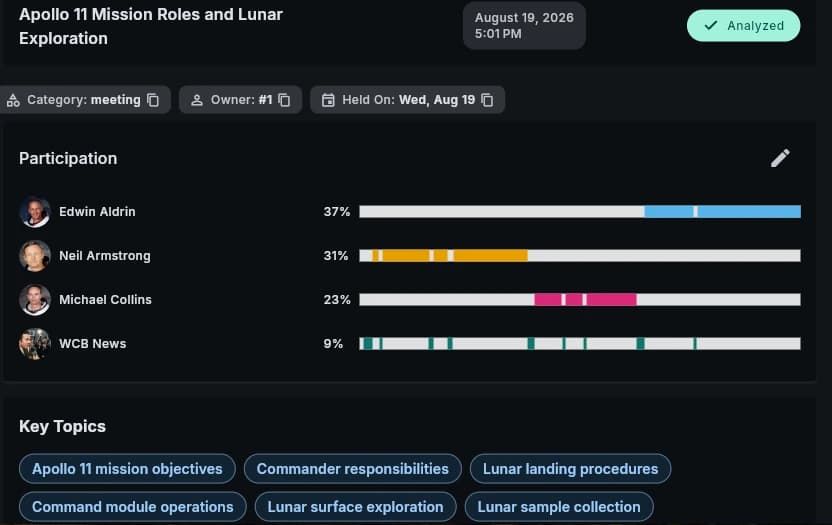
Meeting record, participation split and key topics.
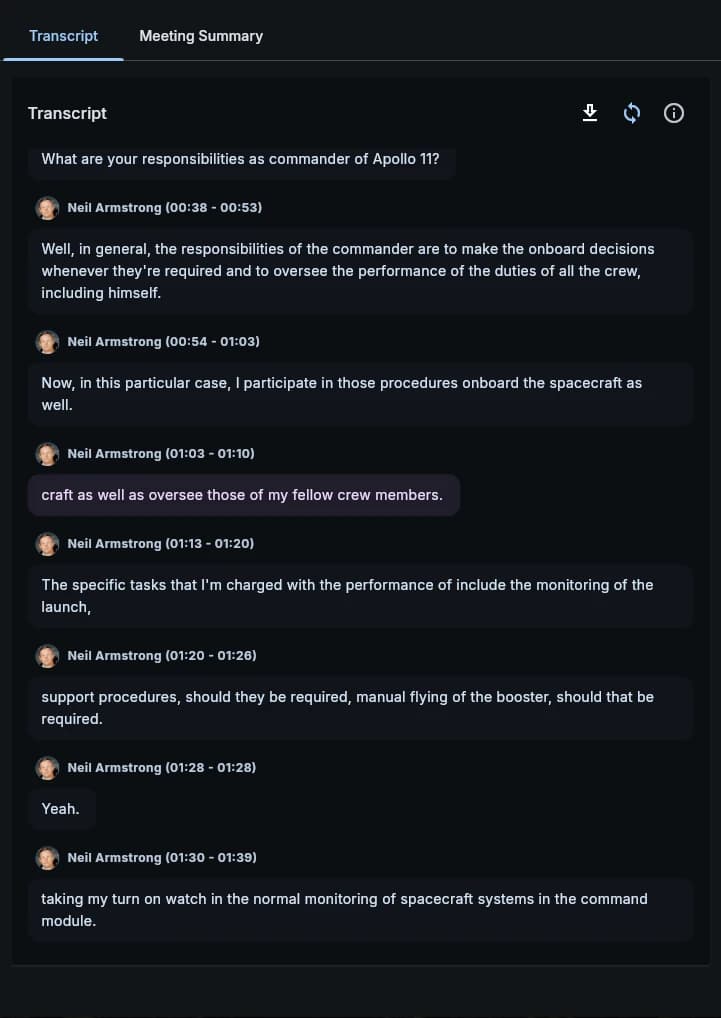
Timestamped dialogue, attributed and reviewable.
Audio-based diarization
Speakers and speaking turns are detected from mixed audio — no participant list, no separate channel per speaker, no enrolled voice profiles. That is what makes it work on in-person recordings as well as online ones.
Editable identity and text
Match detected speakers to company users or external contacts, and correct recognised text or a speaker assignment before the conversation is analysed again.
Playback and participation
Review the timestamped dialogue with the recording open beside it. Speaking timelines show how the conversation was actually distributed.
Live meetings and calendars
From a scheduled event to a searchable conversation.
Personal, group and company calendars connect scheduling, invitations, access and the meeting record.
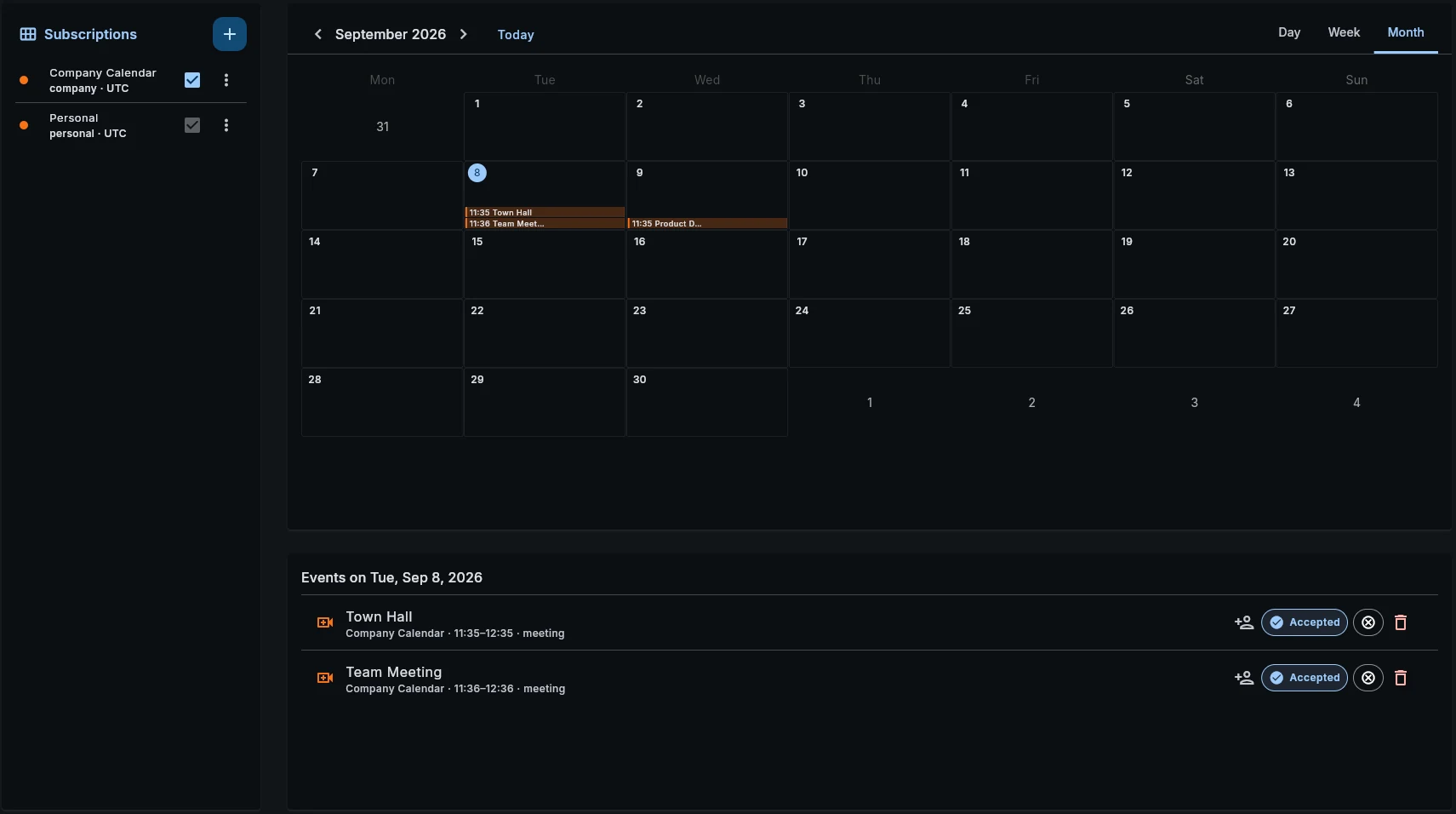
Schedule
Organise an immediate or scheduled meeting and invite the participants.
Join
Authorised hosts and participants receive time-limited joining credentials.
Record
The session is captured through the connected recording service.
Analyse
Completed recordings enter the standard processing workflow.
Provider-based live collaboration
The current integration uses Jitsi for online meetings and its configured recording service for capture. Hosting and recording stay functions of that integration rather than something Verba re-implements.
Invitations and meeting context
Internal users accept or decline; invited external contacts are recorded against the event. Attendee information and session status stay with the meeting record, next to its ownership, category, outputs and processing status.
Business-specific analysis
Your methodology. Your business context.
Configure what the system examines, which knowledge it draws on, and how each type of interaction is assessed.
Company instructions
What to examine and what to produce
Meeting category
Which analyses apply
Analysis workflow
Transcript and configured model
Reference material
Reusable company variables
External context
Selected API-backed values
Several outputs, one conversation
A single meeting can yield summaries, key topics, actions, recommendations and specialised assessments in the same workflow. Your own instructions — prompts, in the product’s language — decide what is examined and how the findings are presented.
Reusable company knowledge
Approved messages, product information and evaluation guidance are maintained centrally and reused through variables. Meeting categories tie each type of interaction to the analyses and scorecards that belong to it.
Current context from connected systems
API-backed variables fetch selected information at the moment an analysis is prepared, with controls for authentication, testing, which part of the response to use, and what to do when the information is unavailable. Company secrets keep credentials out of the analysis instructions themselves.
Model choice and reanalysis
Models are selected separately for the initial analysis, for additional review and for arbitration. Regenerate an analysis from an existing or corrected transcript, or repeat the whole recording-processing workflow when that is what the case needs.
Company-wide default analysis models, and the supported settings for search-by-meaning models, are configured through the API. These company AI defaults are API-only at present.
Scorecard analysis
Show why. Calculate consistently.
The model interprets the conversation. Software validates the result and does the final score arithmetic.
Each scorecard defines what is assessed, what counts as success, and how many points a requirement carries. A complex scorecard can be split into focused assessments criterion by criterion, or run whole. Either way, results stay attached to the individual rules they came from.
Permitted grade
A value the company-defined requirement actually allows.
Supporting evidence
The conversation material behind the result, where the rule requires it.
Explanation
Why the requirement was met or missed.
Improvement guidance
Practical advice on a failed requirement, when that is configured.
Validation before acceptance
Complete and unique
Every required rule has exactly one result, and no rule is answered twice.
Allowed grades
Scores use only the values the scorecard permits.
Required supporting material
Explanations, evidence and guidance are present wherever the rule demands them.
Valid result structure
An incomplete or wrongly structured result is rejected rather than absorbed.
Reviewable visual scorecards
Detailed and overall scores appear with their explanations and supporting material. A company can require evidence for positive grades and improvement advice for failed requirements.
Stable fields for connected systems
Clearly named score fields and versioned export definitions give reporting tools a fixed shape to read, instead of leaving them to extract numbers out of generated paragraphs.
Review coverage
Every recorded conversation is reviewed, rather than the handful a manager had time for.
- Reviewed by hand
- Reviewed by Verba
Criteria across teams
The same criteria applied to every team, so a gap reads as a gap instead of as an impression.
- Met
- Partial
- Gap
Recurring themes
Objections and risk signals grouped across the batch, so a pattern becomes countable rather than anecdotal.
Additional quality controls
Review the interpretation. Resolve the disagreement.
Precision review and arbitration add configurable checks, so the most recent model opinion is never the automatic final answer.
AI assessment
Company rules and transcript
Software validation
Structure, grades, evidence
Precision review
Optional targeted corrections
Score change proposed?
Arbitration enabled
Arbiter review
Blinded, randomised candidates
Accepted grades, calculated results
Final validation and software scoring
Precision mode: a focused second review
An optional review checks the first assessment against the transcript and the same company standards. It proposes specific corrections rather than replacing the whole result, and with arbitration disabled those validated corrections apply directly.
Arbiter mode: resolving a disputed score
When Precision proposes a different score, the optional arbiter settles it. Candidates are presented without identifying which evaluator produced them and in randomised order, which is what keeps the decision away from model preference and answer-position preference.
Validation
Checks completeness, permitted structure and required supporting material.
Precision
Checks the initial interpretation against the transcript and the standards.
Arbitration
Resolves a proposed score change with one further assessment.
Each evaluation stage can use a separately selected model, and review depth is configured per workflow: a standard assessment where that is appropriate, more review where it is not. The business decision stays with the organisation.
From a result to a decision
The same evaluation, read three different ways.
An assessment is only worth producing if the person who has to act on it can use it. One result, three readings of it.
The manager coaches a moment
Open the failed requirement, read why it failed, and go to the passage it came from. The conversation with the representative is about a specific question, message or missing next step rather than about a general impression of how they are doing.
The quality team defends a standard
Criteria, reference material and scoring rules are maintained centrally and reused. When a finding is disputed the evidence is already attached to it; when the transcript was wrong, correct it and re-run the analysis from the corrected source.
The business gets a field it can read
Named score fields and versioned export definitions give reporting tools a fixed shape. Exception lists, management views and follow-up workflows are built on the result itself rather than on numbers parsed back out of generated prose.
Search and company knowledge
Ask naturally. Find the material that matters.
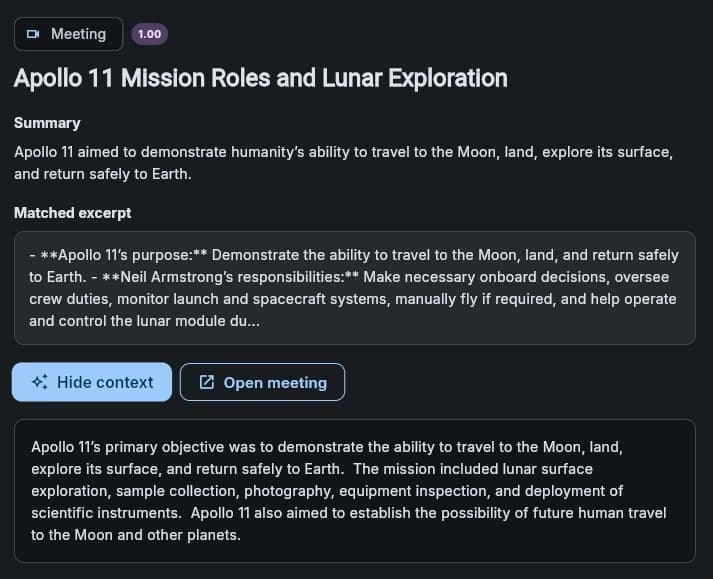
One search across indexed meetings, uploaded documents, Confluence pages and connected S3-compatible storage.
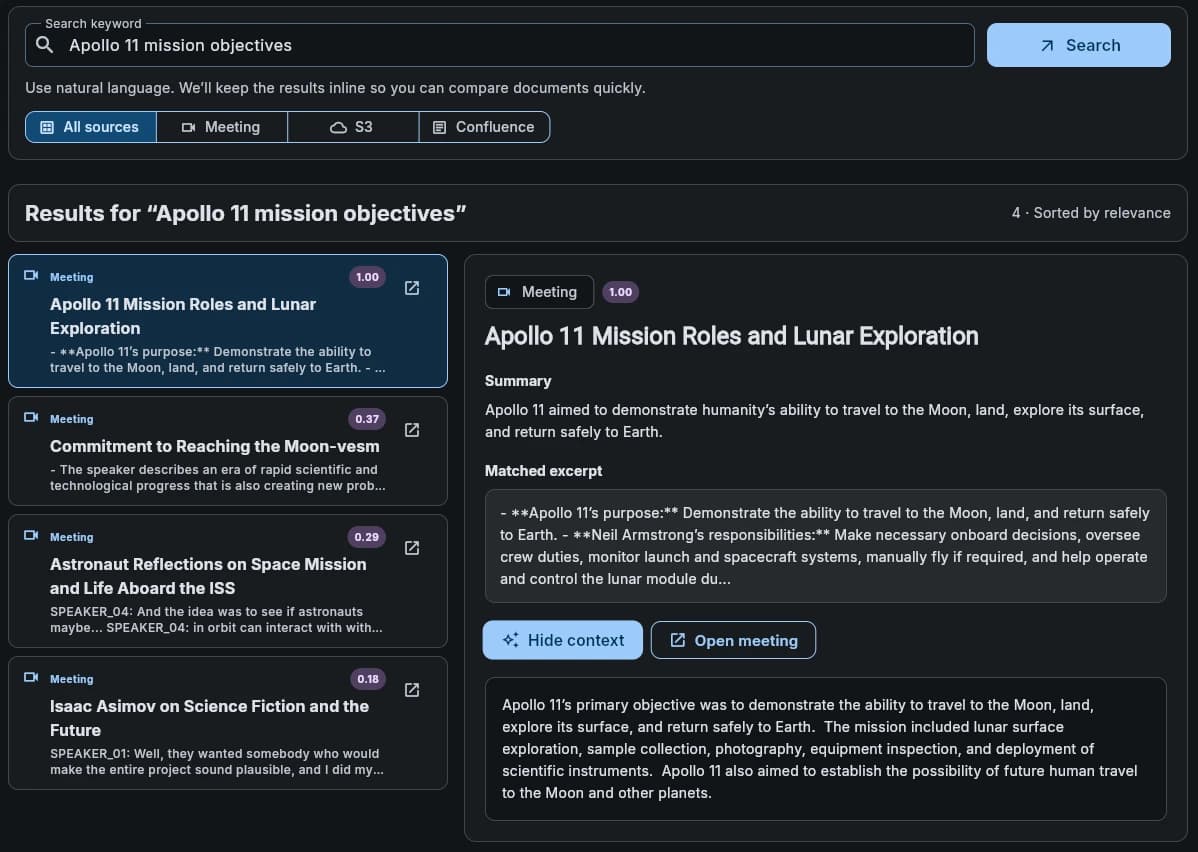
Ranked relevance
Exact, full-text, fuzzy and semantic matches are combined, rather than everything resting on one search method.
Useful previews
Excerpts, summaries and source details explain what a result holds before the full material is opened.
Focused retrieval
Narrow to a supported source type. Search stays inside the authenticated company’s own indexed knowledge.
Four ways of matching
Exact and prefix
Titles, codes and identifiers, including beginning-of-name matches.
Full text
Words and terminology inside the content, not only in its title.
Fuzzy
Material found when the wording is half-remembered or a word is misspelled.
Semantic
Related meaning, expressed in different words.
A document library that stands on its own
Upload, browse, filter, rename, download and delete company documents. Text-based documents can be written and edited inside the platform, and extracted content becomes available to multisource search.
- Word
- Markdown
- HTML
- JSON
- Plain text
- YAML
Revision-aware updates
A content change creates a new revision, and an update based on an outdated one is rejected rather than allowed to overwrite. Indexing status and retry controls make a processing problem visible instead of silent.
Controlled knowledge updates
Changes and removals in a connected source update the indexed content. A replacement index is built and validated before it goes live; if it is incomplete, the current one stays in place.
Platform and operations
See the work. Control the access. Connect the result.
Activity and resource use in one workspace, corporate identity behind the permissions, and supported interfaces carrying finished assessments onward.
Dashboard and operations
A configurable workspace
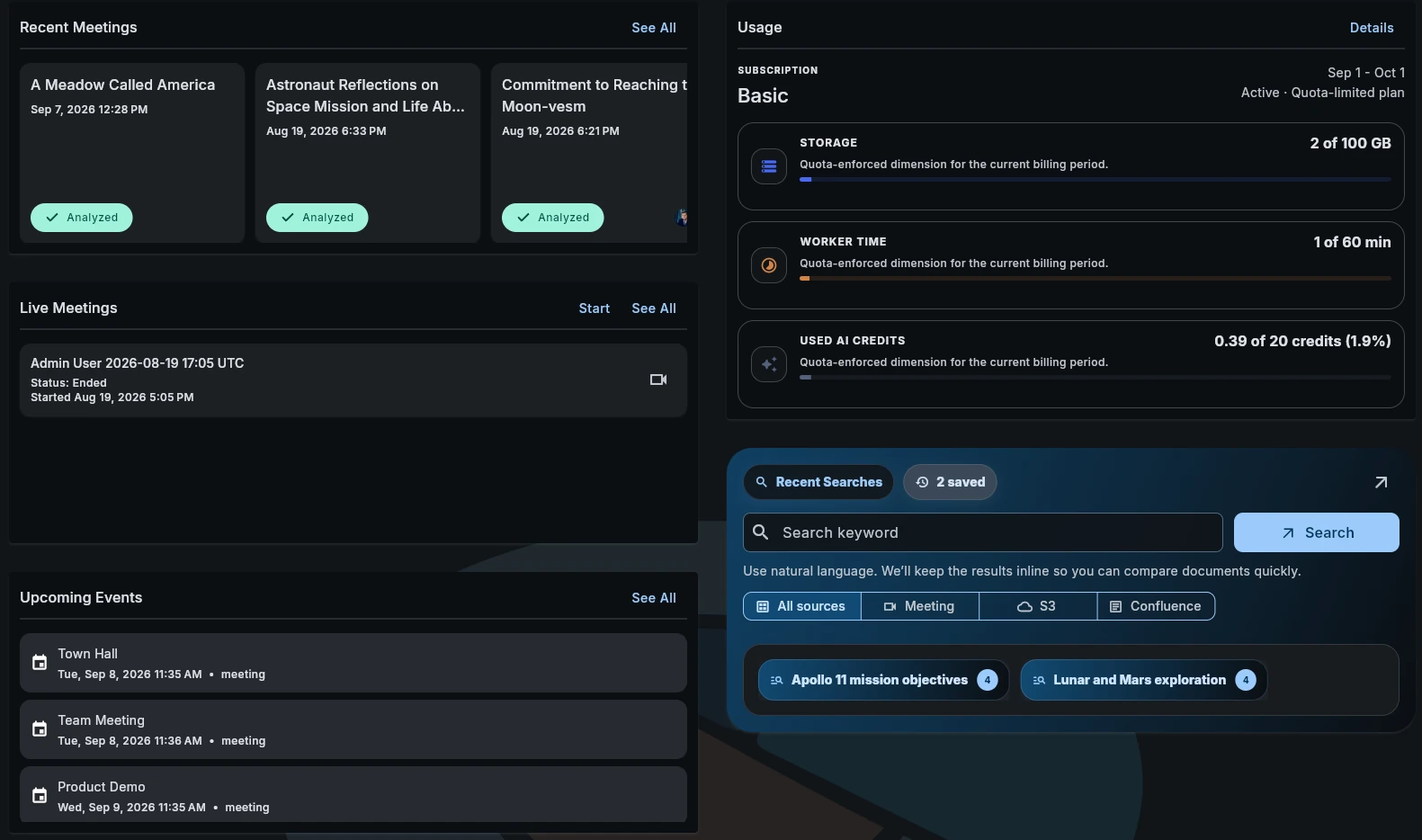
Adjust which widgets appear and in what order — recent meetings, live sessions, upcoming events, usage and recent searches in one view.
Processing status and history
Task status, recorded resource use and errors distinguish finished work from work that needs attention.
Usage and capacity
Credit use, storage consumption, processing allowances and subscription limits, so planning and administration have something to plan against.
Automated housekeeping
Scheduled tasks clear expired sessions and abandoned uploads, refresh operational information, and resume deferred work that has become eligible again.
Licence management
Deployment-wide licence refresh and validation keep operation continuous under the configured licence.
Corporate identity, policy-controlled access
Keep people and teams aligned with the directory, then apply the permissions their responsibilities actually call for.
Corporate directory
People and team membership
Platform accounts
Synchronised users and groups
Access policies
Direct, inherited and temporary
Protected operations
Permissions enforced in the backend
LDAP and corporate directories
Verba connects over LDAP to compatible directories, Microsoft Active Directory among them, so people sign in with the corporate credentials they already have. Synchronisation creates and updates accounts and keeps group names and membership aligned.
Controlled directory coverage
Configurable locations, filters, group exclusions and field mappings decide which records are included. An LDAP-managed account that leaves the configured scope is removed on the next synchronisation. Connection tests, manual runs and scheduled updates surface results and errors.
Reusable policies, understandable permissions
- Company and team scope
- Assign reusable permission sets to individuals and to teams, synchronised groups included.
- Direct and inherited access
- Combine a personal assignment with the permissions that arrive through group membership.
- Explicit restrictions
- Resolve overlapping allow and deny rules through defined priorities.
- Temporary permissions
- Start and end dates for access that is only meant to last a while.
- Effective access detail
- See where a permission came from and whether it is currently active.
APIs and event automation
Supported APIs and event notifications connect an assessment to the applications that manage review, reporting and follow-up.
Analysis complete
The configured workflow produces accepted results.
Notify
A supported webhook signals completion.
Retrieve
The connected application requests the structured results.
Act
The customer system runs its own review, reporting or follow-up.
Application integration through APIs
Supported meeting, document, search, configuration and administration operations give an external application a controlled way to ask for information or take an action — so Verba is not an isolated workspace people have to visit.
Structured results for downstream use
Named score fields and versioned export definitions are a stable basis for reporting and customer-specific integration. A connected system uses the result rather than parsing numbers out of generated prose.
Event delivery and recovery
Supported meeting events, analysis completion among them, notify a connected system and trigger its next action. Delivery attempts and failures are recorded, and eligible notifications are retried on a schedule when an endpoint is unavailable.
Protected outbound connections
Company secrets provide reusable integration credentials without putting passwords or tokens inside analysis instructions. API-backed variables use the same mechanism to fetch external context when an assessment is prepared.
Deployment and growth
Choose where it runs. Scale the work that grows.
Cloud, private-cloud, self-hosted and hybrid configurations cover different infrastructure and data-location requirements.
Three decisions, one configuration
Where the platform runs
Cloud, private cloud, self-hosted or hybrid — and, separately, where each connected service processes what it is given.
How people sign in
The corporate directory, the groups synchronised from it, and the access policies each responsibility actually calls for.
Where the results go
The APIs, event notifications and export definitions that carry a finished assessment into the systems that act on it.
The second and third are the section above this one. They are listed here because procurement, IT and the team that will own the results have to agree them together, and a deployment plan that settles only the first is not a plan.
Where it runs
Cloud
Cloud resources sized to the organisation’s workload.
Private cloud
Dedicated infrastructure for agreed hosting requirements.
Self-hosted
Infrastructure and operations under the customer’s own control.
Hybrid
An agreed combination of environments and services.
User-facing application
Meeting records, review, search and status
Transcription
Media processing
AI analysis
Configured evaluations
Indexing
Searchable knowledge
Document export
Formatted outputs
Parallel processing
Specialised workers take queued jobs concurrently. Heavy media processing, analysis, knowledge indexing and document export are separated from the application people are using.
Targeted capacity expansion
Add capacity where demand is greatest instead of growing every component equally. Transcription and analysis scale on their own resource profiles.
Flexible hardware
CPU and supported GPU resources are allocated to the services that need them, GPU-accelerated media processing included. Containerised services can be spread across whatever infrastructure suits the workload.
Workload-based sizing
Plan against recording length, analysis depth, expected volume, any optional review stages and the completion window you need. The deployment model and the connected services follow from that, not the other way round.
Knowing when to add capacity
A team starts with a few conversations. More recordings and deeper evaluations follow. The operational view is what turns that growth into a decision rather than a surprise.
Follow the work
Completed tasks, errors and processing history, so a failed job is something you investigate rather than something you hear about later.
See what it costs to run
Processing time, storage consumption and recorded usage, read against the allowances the deployment was sized for.
Size the next step
Add capacity to the service the demand is actually in — transcription, analysis, indexing or export — before the queue becomes the constraint.
Planning a deployment
Three steps, in this order, before anything is switched on for a wider group.
Map the environment
Hosting preferences, the account directory, the knowledge sources worth indexing, and the systems that will need the results.
Configure the connections
Where components and processing services run, which roles and policies apply, which integrations are in scope, and how much capacity the workload calls for.
Validate the workflow
Sign-in, source indexing, conversation processing and result delivery, all checked end to end on real material before use is broadened.
Configuration and adoption
One platform. Your operating model.
Define the people, standards, knowledge and integrations once, then apply the configured workflow across conversations and teams.
People and access
Company users, contacts, groups, directory coverage and access policies. Agree who reviews findings and who administers the platform.
Conversations and evaluations
Meeting categories, intake methods, instructions, reusable reference variables, scorecards, allowed grades, model choices and any optional review stages.
Knowledge and integrations
Indexed document sources, transcript export templates, external context, supported API operations and outbound event workflows.
Operations and infrastructure
Deployment model, processing resources, expected workload, operational responsibilities and the processing window the business needs.
Your standards define the assessment.The conversation supplies the evidence.
Before the demo
The questions that arrive first.
Short answers to the six that come up in almost every evaluation.
Can we evaluate against our own criteria?
That is the design. A scorecard is your list of requirements, your definition of success and your point values, and the analysis instructions are yours as well. Verba supplies the workflow around your standards; it does not bring standards of its own.
Does it work on recordings made in the room?
Yes. Speakers are separated from the audio itself — no participant list, no separate channel per person, no enrolled voice profiles. That is exactly what makes an in-person recording work the same way an online one does.
What can one conversation produce?
A summary, notes, key topics, decisions, recommendations, follow-up actions and one or more detailed assessments, in the same run. Which of those appear is a per-category setting, so an internal planning session and a doctor call need not produce the same thing.
Who checks the score?
Software does the structural validation and all of the arithmetic. An optional second-pass review checks the interpretation, and optional arbitration settles a disputed grade using blinded, randomised candidates. The business decision stays with your team.
Can it search what the company already knows?
Indexed meetings, uploaded documents, connected Confluence pages and S3-compatible storage are searched together — by exact match, full text, spelling-tolerant match and meaning. Each company searches only its own indexed material.
Can it run inside our own infrastructure?
Cloud, private cloud, self-hosted and hybrid are all supported. Where each component and each connected service runs is agreed as part of the configuration rather than assumed — see the deployment section above for what that decision actually covers.
Evaluate it on your own conversations
Bring a batch of real recordings, the standards you review against, and one example of what a good review looks like. We will configure the categories, instructions and scorecards around your process and let you compare the output against a manually reviewed sample from the same batch.
Request an evaluationEdition and scopeThis page describes implemented features as of the September 2026 product description. Interface images are demonstration views: their example content and usage values are neither customer results nor commercial terms.